AI Automations
Voice AI ReceptionistCustom AI AssistantsLead Nurturing & SMS Text-BackReview AutomationAI Appointment SchedulingNo-Show Recovery AutomationClient Case Studies
Turf Titans Local SEO PlaybookTurf Titans
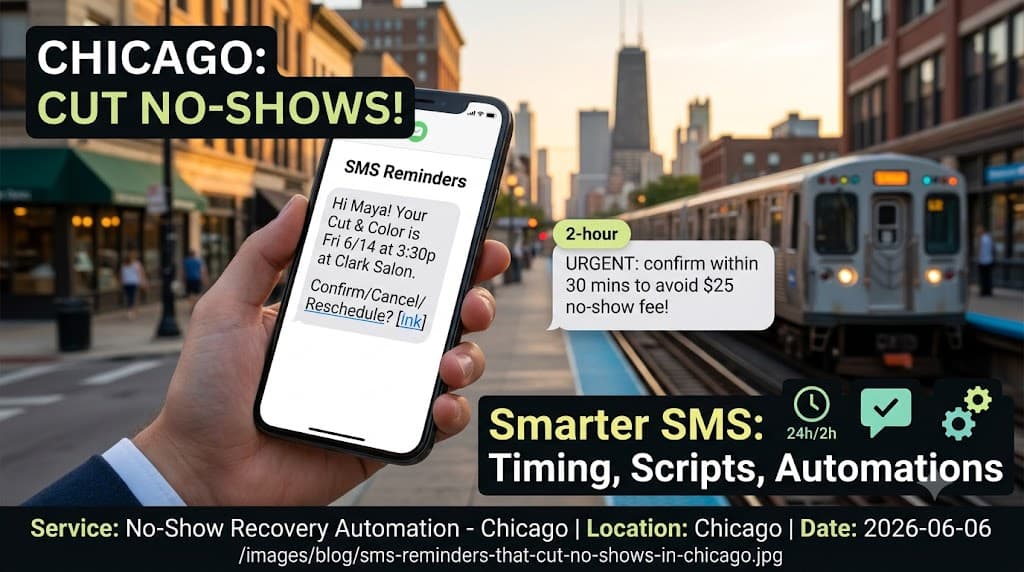
Chicago’s summer is glorious—and chaotic. That’s exactly why the counterintuitive move of making it dead‑simple to cancel inside your reminder will help you keep more appointments. Every easy cancel turns into an instant backfill when your waitlist automation fires.
Why this matters here: on hot June–August days, clients skip out for lakefront evenings, neighborhood street festivals, Cubs or Sox games, kids’ camps, or weekend trips up I‑94. Calendars get whiplash. If you’re a salon in Lakeview, a clinic in the Loop, or an auto shop in Jefferson Park, you need reminders designed for Chicago’s schedule swings—not generic national advice on “best practices.”
Bottom line up front: the most reliable way to reduce missed appointments is to send two well‑timed texts—24 hours and 2 hours before—with one‑tap confirm/cancel plus a reschedule link, and immediately offer any canceled slot to your waitlist. If you want a done‑for‑you setup, see our no‑show recovery automation for Chicago businesses (/services/no-show-recovery-automation-chicago). This article shows exactly how to reduce appointment no-shows with SMS the Chicago way.
Do SMS reminders really reduce appointment no-shows? — how to reduce appointment no-shows with SMS
Yes—when the reminders are tightly timed and actionable. A plain “Don’t forget!” helps a little. A Chicago‑tuned reminder that lets people confirm or cancel with one tap helps a lot because it converts uncertainty into a decision. The moment someone cancels, your system should text the next best‑fit person on your waitlist.
What moves the needle isn’t volume of texts—it’s reducing friction. Chicago customers are often in transit, between meetings, or wrangling kids. A clear message with one‑tap choices respects that reality. Two reminders (24h and 2h) are enough to catch both planners and day‑of forgetters without feeling spammy.
If you need this built without duct tape, our no‑show recovery automation for Chicago sets up confirm/cancel links, rescheduling, and waitlist backfilling in one flow (/services/no-show-recovery-automation-chicago).
What is the best time to send appointment reminder texts?
Use two anchors: 24 hours before and 2 hours before the appointment—both in Central Time. The 24‑hour note catches people while they still have options to adjust. The 2‑hour note cuts through the noise of the day and triggers a fast confirm or cancel before travel time.
Chicago nuance matters:
- •Evening rush and events: Avoid sending the 24‑hour reminder precisely during the evening commute if your clients tend to be on the Kennedy or the Red Line—try 5:15 p.m. or 7:45 p.m., not 6:00 p.m. sharp.
- •Early appointments: If a client is booked at 8:00 a.m., the 2‑hour reminder should go at 6:00 a.m.—but consider queuing it for 7:00 a.m. if your audience reacts poorly to pre‑7 a.m. texts.
- •Weekend patterns: For Saturday slots, send the 24‑hour reminder by late Friday afternoon before people disappear for the evening, and the 2‑hour reminder early enough to beat brunch and ballgames.
What should an effective SMS reminder say?
Clarity beats charm. Put the when/where first, then one‑tap choices, then a short reschedule link. Keep it scannable in under ~200 characters.
Template for Chicago service businesses:
- •“Hi Maya—Cut & Color with Ruby is Fri 6/14 at 3:30p (1234 N Clark). Please tap: [Confirm] [Cancel] [Reschedule]. Reply STOP to opt out.”
- •“Dr. Patel visit: Tue 7/9 at 9:10a, 55 E Washington, Ste 400. [Confirm] [Cancel] [Reschedule]. Please arrive 10 min early for forms.”
- •“Oil change at Lakeshore Auto: Wed 8/21 1:00p. [Confirm] [Cancel] [Reschedule]. If you cancel, we’ll offer the time to our waitlist.”
Notes:
- •Always include business name, date/time, location if relevant, and the one‑tap actions.
- •Use short call‑to‑action labels. Long URLs increase friction; shrink links where your platform allows and keep the labels clean.
- •Mention “Reply STOP to opt out.” It’s good hygiene and sets expectations.
How do I add one‑tap confirm or cancel links? — how to reduce appointment no-shows with SMS
Under the hood, those are just unique URLs per appointment that update status immediately.
The simple build:
- •Generate two signed links on each booking: Confirm and Cancel. Each URL encodes the appointment ID and expires after the appointment time.
- •When tapped, Confirm marks the appointment “Confirmed,” logs a timestamp, and sends a short “You’re set—see you at 3:30 p.m.” reply.
- •When tapped, Cancel marks it “Canceled,” offers a reschedule page, and triggers the waitlist broadcast for that exact service, duration, and location.
Make room for a fallback. Not everyone likes links. Accept quick replies like “C” to confirm and “X” to cancel. Your SMS gateway should map those to the same actions, then return a friendly confirmation.
How can I automatically refill a canceled slot with a waitlist?
Treat your waitlist like a living queue, not a spreadsheet you’ll “get to later.”
Build it right:
- •Segment by service and duration. A 90‑minute color correction shouldn’t be offered to someone waiting for a 30‑minute trim.
- •Prioritize by proximity and fit. If you have multiple locations, match the canceled slot to clients who prefer that location first.
- •Offer the slot to a small batch. Text the top 3–5 best matches first: “A 3:30p spot today just opened with Ruby—tap to claim.” If no one grabs it in 5 minutes, text the next batch.
Make it truly one‑tap:
- •The “Claim” link should check availability, reserve the slot first‑come‑first‑served, and send a confirmation page without extra forms.
- •If the spot is taken, show alternative times and keep the person on the waitlist automatically.
Timing for Chicago:
- •Day‑of refills work best mid‑morning and early afternoon, before traffic builds and before evening events. For neighborhoods near major venues, pause offers during big games or concerts to avoid frustration.
If this sounds like a lot to wire up, Base64 Marketing builds and manages confirm/cancel links, reschedule pages, and waitlist automations for busy Chicago teams. See no‑show recovery automation → Same‑day setup review. No long‑term contracts.
How do I collect TCPA‑compliant SMS opt‑in for reminders?
Be explicit, be specific, and keep a record.
- •Collect opt‑in at booking, on intake forms, or via a quick web form. Use a clear checkbox that isn’t pre‑checked.
- •Say what you’ll send: “Appointment reminders and updates,” not “marketing.” If you also send promos, collect that as a separate opt‑in.
- •State frequency in plain language: “Up to 2 reminders per appointment.”
- •Include opt‑out language: “Reply STOP to cancel, HELP for help.”
- •Store consent details: timestamp, source (online booking, kiosk, front desk), and the version of your disclosure.
For returning clients created before you offered SMS, ask them to confirm consent the next time they book or at check‑in: “Can we text you appointment reminders? Reply YES to opt in.”
Should I send a same‑day reminder or morning‑of message?
If you’re following the two‑touch cadence—24 hours and 2 hours—you’re already covered. The “morning‑of” often duplicates the 2‑hour alert and can feel like over‑messaging.
Refine by appointment time:
- •Early morning appointments (before 9:00 a.m.): the 24‑hour reminder is key; the 2‑hour goes early. If your audience dislikes pre‑7 a.m. texts, schedule it for 7:00 a.m. and adjust your buffer (e.g., from 2 hours to 90 minutes).
- •Midday and evening appointments: the 2‑hour reminder is the workhorse. Add calendar attachments only if your audience uses them; otherwise they clutter the SMS.
When would a third touch make sense? Rarely—maybe for high‑no‑show cohorts during peak summer Fridays. Test carefully. Our stance stands: more texts tend to depress response and drive opt‑outs.
What reminder cadence works best for Chicago salons, clinics, and auto shops?
Salons and barbershops
- •Peak volatility: sunny Fridays and Saturdays, festival weekends, and days with big games.
- •Cadence: 24h + 2h. Add a “prep note” only when needed (e.g., “Please arrive with dry hair”).
- •Waitlist tip: Offer day‑of openings to clients within a 1–2 mile radius first—many will walk or hop on the Brown Line if the timing is right.
Medical and wellness clinics
- •Peak volatility: school breaks, summer travel, and downtown parking surges during events.
- •Cadence: 24h + 2h. Include a link for forms or co‑pay details in the 24‑hour message; keep the 2‑hour message short and action‑oriented.
- •Waitlist tip: Prioritize patients already on file for that provider and location. Offer telehealth swaps when an in‑person slot cancels late in the day.
Auto shops and service centers
- •Peak volatility: first hot weeks (AC issues), post‑holiday drive‑backs, and construction season detours.
- •Cadence: 24h + 2h. For drop‑offs, the 2‑hour reminder should mention ETA and shuttle/ride‑share options if available.
- •Waitlist tip: Keep separate waitlists by service (oil change vs. diagnostics) and vehicle size. Fill short slots first to avoid backing up bays.
How to evaluate success for any Chicago business:
- •Track confirm rates by time of day and day of week. You’ll often see stronger 2‑hour confirmations on weekdays between 11:00 a.m.–1:00 p.m. and 4:00–5:30 p.m.
- •Watch cancel‑to‑backfill time. The goal is minutes, not hours.
- •Monitor opt‑outs. Spikes usually mean you’re sending too many messages or texting outside comfortable hours.
Local takeaway
In Chicago, summer unpredictability is a given. The fix isn’t more messaging—it’s smarter messaging. Two reminders—24 hours and 2 hours—each with one‑tap confirm/cancel and a reschedule link, paired with a waitlist that can fill openings in minutes, is the proven play. Keep messages short, consent clean, links actionable, and timing respectful of the city’s rhythms.
Hold this line: more texts hurt response rates and drive opt‑outs. Build for decisions, not nudges.
Ready to tune your reminders to Chicago’s reality? Get a no‑pressure plan for your neighborhood and industry here: Chicago no‑show recovery and SMS help →
FAQs
Common questions
Do I need a short code for reminders, or is 10DLC enough?▾
Most Chicago businesses use registered 10DLC or verified toll‑free numbers. Short codes are optional and mainly for very high volume.
What should my opt‑in checkbox say for SMS reminders?▾
Use clear, plain language naming your business, purpose (appointment reminders), message frequency, and STOP to opt out.
How long should a reminder text be?▾
Aim for 140–200 characters. Put date/time first, then one‑tap Confirm/Cancel, plus a short reschedule link.
Can I personalize SMS with the client’s name?▾
Yes—use merge fields with safe fallbacks. If the name is missing, default to a friendly generic like 'Hi there.'
What if someone replies STOP or cancels?▾
Honor STOP immediately and record it. If they cancel, trigger your waitlist automation and send a reschedule link.
Can reminders go to landlines?▾
Not unless the line is text‑enabled. Collect a mobile number during booking and validate it before sending SMS.
Get Started
Get the audit: we'll show your top 10 ranking + lead leaks.
We'll show your top 10 ranking + lead leaks, and exactly what to fix first.
Or call us: (312) 646-0326